
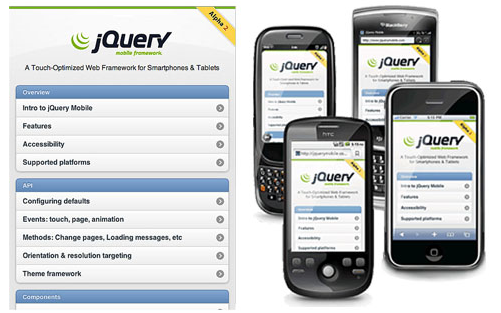
 With the release of Windows Phone 7 last year, I’m really interested in mobile applications. Why? Well, developing for Windows Phone 7 did not require me to learn new things. I can use my current skill set and build cool apps for that platform. But what about the other platforms? If you look at all platforms from a web developer perspective, there’s one library that also allows you to use your existing skill set: jQuery Mobile.
Know HTML? Know jQuery? Know any web development language like PHP, RoR or ASP.NET (MVC)? Go ahead and build great looking mobile web apps!
I’ll give you a very short tutorial, just enough to sparkle some interest. After that, it’s up to you.
Getting jQuery Mobile running in ASP.NET MVC
This one is easy. Start a new project and strip out anything you don’t need. After that, modify your master page to something like this:
<%@ Master Language="C#" Inherits="System.Web.Mvc.ViewMasterPage" %>

<!DOCTYPE html>
<html>
<head runat="server">
    <title><asp:ContentPlaceHolder ID="TitleContent" runat="server" /></title>
    <link href="../../Content/Site.css" rel="stylesheet" type="text/css" />

    <link rel="stylesheet" href="http://code.jquery.com/mobile/1.0a2/jquery.mobile-1.0a2.min.css" />
    <script src="http://code.jquery.com/jquery-1.4.4.min.js"></script>
    <script src="http://code.jquery.com/mobile/1.0a2/jquery.mobile-1.0a2.min.js"></script>
</head>

<body>
    <asp:ContentPlaceHolder ID="MainContent" runat="server" />
</body>
</html>
That’s it: you download all resources from jQuery’s CDN. Optionally, you can also download and host jQuery Mobile on your own server.
Creating a first page
Pages have their own specifics. If you look at the docs, a page typically consists of a div element with a HTML5 data attribute “data-role” “page”. These data attributes are used for anything you would like to accomplish, which means your PC or device needs a HTML5 compatible browser to render jQuery Mobile content. Here’s a simple page (using ASP.NET MVC):
<%@ Page Title="" Language="C#" MasterPageFile="~/Views/Shared/Site.Master" Inherits="System.Web.Mvc.ViewPage<RealDolmenMobile.Web.Models.ListPostsModel>" %>

<asp:Content ID="Content1" ContentPlaceHolderID="TitleContent" runat="server">
    Page title
</asp:Content>

<asp:Content ID="Content2" ContentPlaceHolderID="MainContent" runat="server">


# Title here


Contents here


#### Footer here


</asp:Content>
Building a RSS reader
I’ve been working on a simple sample which formats our RealDolmen blogs into jQuery Mobile UI. Using Argotic as the RSS back-end, this was quite easy to do. First of all, here’s a HomeController that creates a list of posts in a view model. MVC like you’re used to work with:
using System;
using System.Collections.Generic;
using System.Linq;
using System.Web;
using System.Web.Mvc;
using Argotic.Syndication;
using RealDolmenMobile.Web.Models;
using System.Web.Caching;

namespace RealDolmenMobile.Web.Controllers
{
    [HandleError]
    public class HomeController : Controller
    {
        private static readonly Uri Feed = new Uri("http://microsoft.realdolmenblogs.com/Syndication.axd");

        public ActionResult Index()
        {
            // Create model
            var model = new ListPostsModel();

            GenericSyndicationFeed feed = GenericSyndicationFeed.Create(Feed);
            foreach (GenericSyndicationItem item in feed.Items)
            {
                model.Posts.Add(new PostModel
                {
                    Title = item.Title,
                    Body = item.Summary,
                    PublishedOn = item.PublishedOn
                });
            }

            return View(model);
        }
}
Next, we need to render this. Again, pure HTML goodness that you’re used working with:
<%@ Page Title="" Language="C#" MasterPageFile="~/Views/Shared/Site.Master" Inherits="System.Web.Mvc.ViewPage<RealDolmenMobile.Web.Models.ListPostsModel>" %>

<asp:Content ID="Content1" ContentPlaceHolderID="TitleContent" runat="server">
    RealDolmen Blogs
</asp:Content>

<asp:Content ID="Content2" ContentPlaceHolderID="MainContent" runat="server">


# RealDolmen Blogs


- Posts by employees<%:Model.Posts.Count()%>
- ### <%:Html.ActionLink(post.Title, "Post", new { title = post.Title })%>

                    Published: <%:post.PublishedOn.ToString()%>


####


</asp:Content>
The result? Not very stunning when looked at with IE8… But fire up Chrome or any other HTML5 capable browser, and here’s what you get:
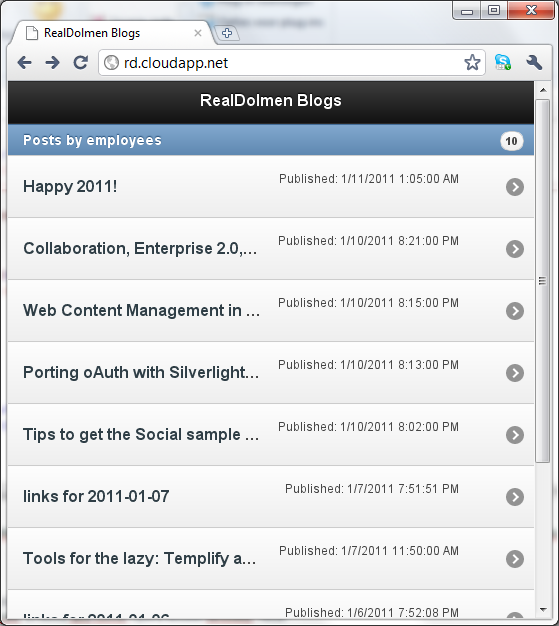
I’ve asked some people to check http://rd.cloudapp.net (may be offline by the time you read this), and I’ve received confirmation that it looks good on iSomething-devices, a Nokia and some Opera Mobile versions. Nice!
Goodies
The above example may not be that spectacular. The framework does hold some spectacular things! Think dialogs, forms, gestures, animations and a full-blown navigation framework that replaces any form or hyperlink with an AJAX call that is executed in the back-end, displays a nice “loading” screen and automatically generates a “back” button for you.
More examples? Check the manual itself over at http://jquerymobile.com/demos/1.0a2/docs/: this has been built using jQuery Mobile and looks nice!
Conclusion
It’s great! Really, I can just go ahead and build cool mobile web sites / web apps. Unfortunately, the WIndows-market of devices has bad support (due to a lack of HTML 5 support on their devices). This should get fixed in a coming upgrade, but untill then you will not have any luck running these apps on Windows Phone 7… For a complete list of compatible browsers and platforms, check the compatibility matrix.
For those interested, I’ve uploaded my small test app here: RealDolmenMobile.zip (420.38 kb) (note that I’ve built this as a Windows Azure solution)